Notion vs Obsidian: the graph view gap
1 November 2026
Only Obsidian has a graph view. Notion does not. It is the difference that comes up most when people compare the two, and the screen most often named as the reason for picking Obsidian.
Obsidian's graph view lays out the links between your notes as dots and lines. You can see which notes are heavily connected and which sit alone, and the picture grows by itself as you write. There is nothing to maintain.
Notion has connections too. Pages are tied together by database membership, subpages and relation properties. What is missing is not the links but a screen that draws them. Table, board, timeline and the rest each show one database at a time, as rows, so the shape of the whole is visible nowhere.
That is where the choice splits. If seeing the shape of your connections matters most, Obsidian. If tables, databases and working with other people matter most, Notion. A lot of people stay on Notion and miss exactly one thing.
You do not have to move for that one thing. Notion-mind reads the three kinds of connection your workspace already has and draws them the way Obsidian's graph view does: pages and databases as nodes, connections as lines, and hovering a node dims everything it is not tied to. Notion stays as it is; the picture is added on top.
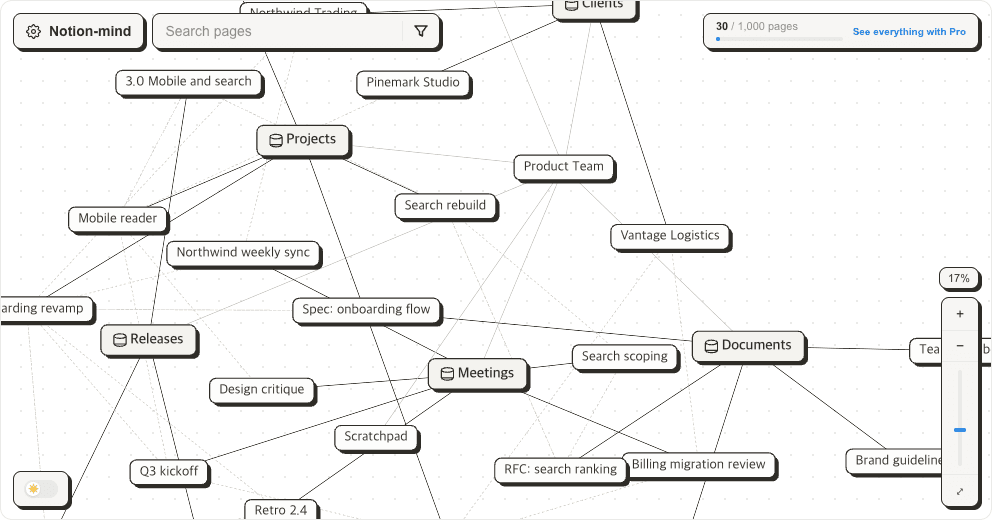
See what your own Notion looks like as a graph.
Sign in with Google, then connect your Notion workspace. Free for up to 1,000 pages.
More posts