Notion backlinks: where they show, and why they sometimes don't
4 November 2026
Backlinks are the list of other pages that point at the page you are on, and they sit just above the page title as "N backlinks". On a database page they appear with the properties. There is nothing to switch on: the moment another page @-mentions or links to this one, the backlink appears.
If you are not seeing one, it is usually one of three things.
- Nothing links here yet. A subpage, or a page sitting in the same database, is membership rather than a link, so it does not count as a backlink
- The tie is a relation property. A relation is a property, not a backlink. That connection shows in the property, not in the backlink list
- Permissions. A link from a page you cannot access does not appear in your list. A link from a page only you can see shows to others as
Private
That part is Notion's job and it works. The limit is elsewhere. Backlinks are one page at a time. They show what points here, not where those pages lead next, and not what the whole looks like; for that you open pages one by one and stitch it together in your head. Membership and relations are outside the list from the start.
Notion-mind draws all three on one screen. Subpages and database membership are solid lines, relation properties are dotted, and hovering a node keeps only the connections in and out of that page while the rest dims. It is the backlink panel, read as a map instead of one page at a time.
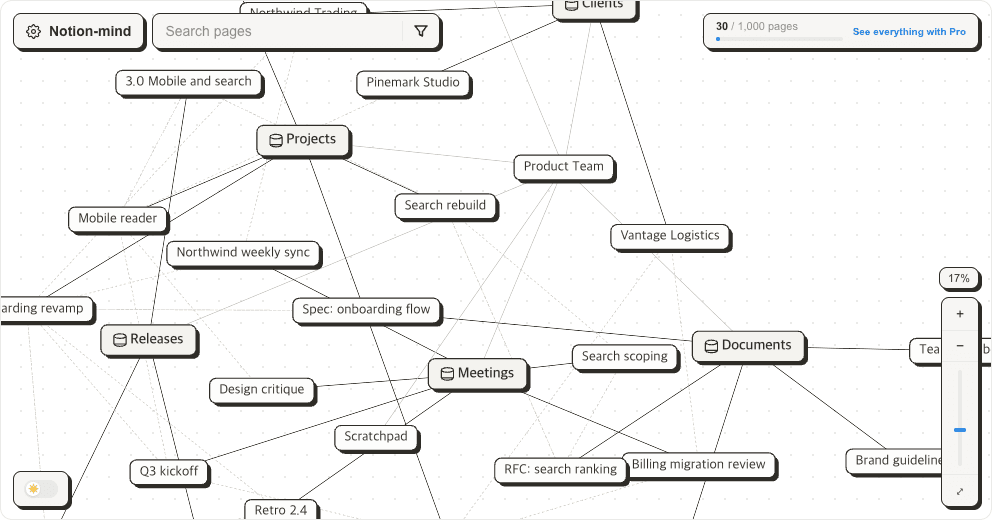
To see which page is linked from where in one look, open your own workspace.
Sign in with Google, then connect your Notion workspace. Free for up to 1,000 pages.