How to make a mind map in Notion
4 November 2026
Notion has no mind map feature, so there are two ways to make one: fake it with toggles, or embed a drawing tool. The five-minute way comes first.
1. Toggles (stays inside Notion)
- On a blank page, make the central idea a toggle block
- Open it and add each branch as a toggle inside
- Nest toggles inside branches for depth. Drag a toggle to move a branch
The upside is that it is searchable and can link to other pages. The limit is that it reads top to bottom like an outline, so you never get several branches spread out side by side.
2. Embed a drawing tool (an actual map)
- Draw the mind map in Miro or Excalidraw. Both are on Notion's list of officially supported embeds
- Copy the share link and paste it into a Notion page. Notion recognises an embeddable URL and offers the choice
- Pick embed, and the board appears inside the page and stays editable right there
If you want the real map shape, this is it. In exchange, Notion search does not see inside it, and nothing in the drawing is tied to your Notion pages.
What both have in common
Both are for ideas you are about to draw. Neither can show how the few hundred pages you already wrote connect. That has to be copied across by hand, and every new page leaves the drawing one step behind.
For pages that already exist, there is nothing to draw. Notion-mind reads database membership, subpages and relation properties and lays the workspace out as a graph as it is.
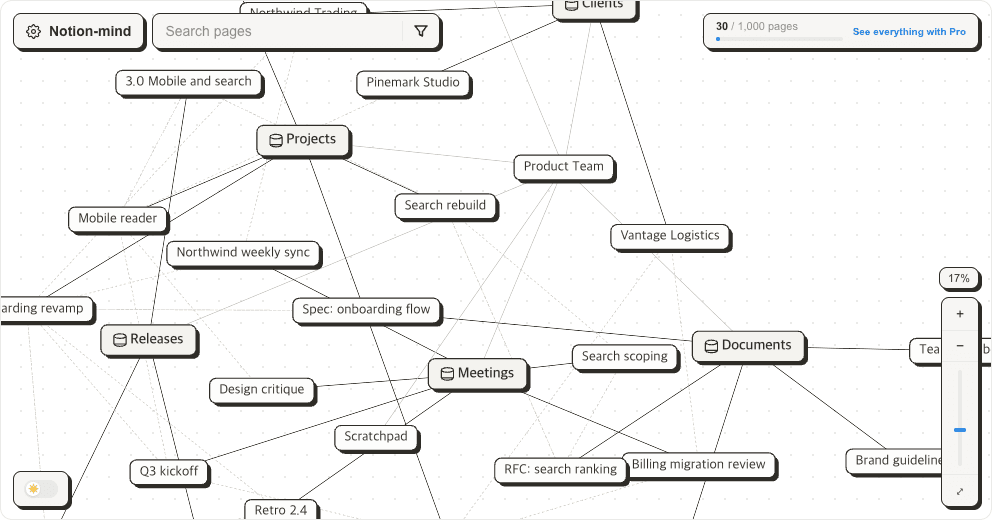
Use the steps above for new thinking, and this for what you have already written.
Sign in with Google, then connect your Notion workspace. Free for up to 1,000 pages.
More posts
- Building a knowledge graph in Notion
- Notion second brain: where it stalls a few months in
- Notion backlinks: where they show, and why they sometimes don't
- Notion relation property vs rollup: what each one shows
- Notion vs Obsidian: the graph view gap
- Does Notion have a graph view?
- Does Notion have mind maps?