Does Notion have mind maps?
1 November 2026
Notion itself has no mind map view and no graph view. This is what a Notion mind map of your own workspace looks like:
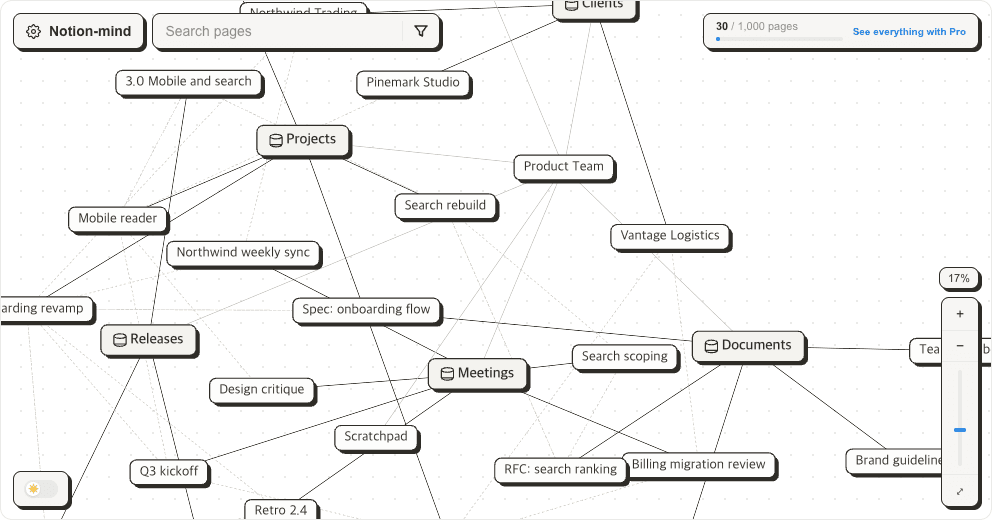
Try the example graph
No sign-in. Drag the nodes and open them.
Why it beats drawing one
- You never draw it. Notion-mind reads the links your workspace already has — database membership, subpages, relation properties — and lays them out for you.
- It cannot go stale. The map is rebuilt from the workspace every time you open it. A hand-drawn diagram starts aging the moment you add a page.
- The whole workspace, one screen. Connections that Notion only shows one database at a time appear side by side.
- Follow one page. Hover it and everything unconnected dims; click it for its properties, its relations and a link straight into Notion.
- Find what you lost. One filter leaves only the pages no relation touches — the notes you wrote once and never found again.
Connect your workspace
Sign in with Google, then connect your Notion workspace. There is no separate account to create. Notion's own consent screen lets you choose which pages to share, so you can try one corner of the workspace first. Titles, properties and relations are read from Notion and drawn in your browser; your content is never stored on our server. Free covers 1,000 pages.
See my own Notion workspace
Sign in with Google, then connect your Notion workspace. Free for up to 1,000 pages.
More posts
- Building a knowledge graph in Notion
- Notion second brain: where it stalls a few months in
- Notion backlinks: where they show, and why they sometimes don't
- How to make a mind map in Notion
- Notion relation property vs rollup: what each one shows
- Notion vs Obsidian: the graph view gap
- Does Notion have a graph view?