Notion relation property vs rollup: what each one shows
3 November 2026
A relation ties a page to other pages. A rollup walks across that tie and brings a value back from the other side to count or sum. That is why a rollup cannot exist until a relation does, and why looking for a rollup first ends with nothing to pick from.
A relation is one-way by default. Add a page from database B to a relation in database A and nothing appears on the B side. The property's setting to show it on the related database (the Show on … toggle) makes it two-way, and from then on an edit from either side updates both. It works inside a single database too, so a task can point at other tasks.
Two things trip people up. Without the two-way toggle, the related page does not know it has been linked. And a rollup is good at counts, sums and latest dates, but it never shows what is tied to what. It folds the tie into one number.
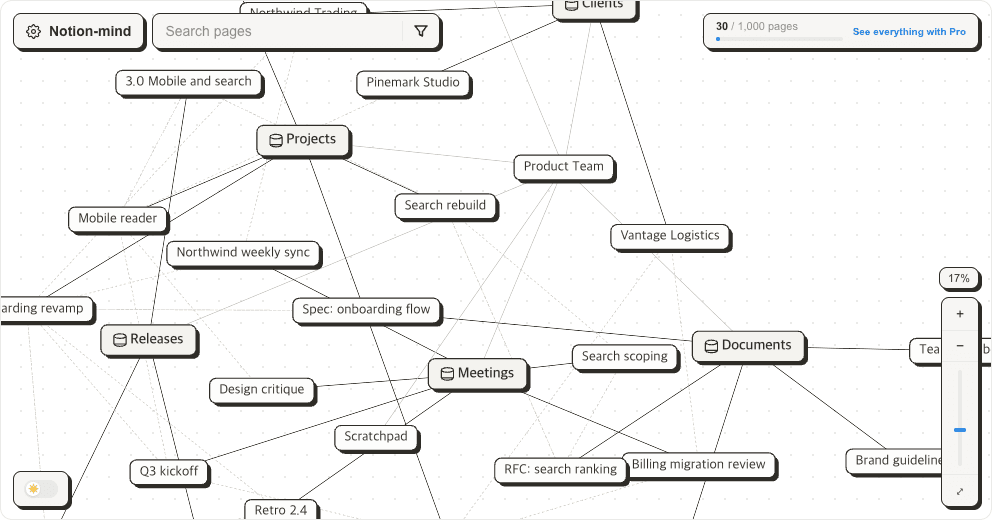
Something else happens as relations accumulate. Each column is visible on its own, yet the shape of all the ties together is visible nowhere. Once three databases point at each other, the web has to be held in your head.
Notion-mind draws those relations as dotted lines. One-way or two-way, it is one line, and it lands on one screen no matter which database it starts from. Database membership and subpages are drawn as solid lines on the same picture, so you can see where a relation cuts across that structure.
See the web your own relations make.
Sign in with Google, then connect your Notion workspace. Free for up to 1,000 pages.